
Demystifying the alias parameter in what3words address URLs


When sharing a what3words address, you may have noticed an extra query string in the URL that looks like
?alias=<something>
. This is the
alias
parameter, which plays an important role in making what3words links more human-readable. In this blog, we’ll explain what the
alias
parameter is, why it exists, when it appears (plus when it’s optional), and how it improves the sharing of what3words addresses – especially in non-Latin scripts like Japanese, Chinese, and Cyrillic.
We’ll also walk you through some examples and show you how to construct a URL with
alias
in code. By the end, you’ll understand exactly what
alias
does (and we’ll dispel any misconceptions that it contains locale codes or other hidden information).
What is the
alias
parameter in a what3words URL?
In a nutshell, the
alias
parameter in a what3words URL contains a plaintext copy of the what3words word address. It’s simply the three words of the address (in their original language and script), unencoded and without the
///
prefix. For example, if the what3words address is ///filled.count.soap, an
alias
parameter would contain
filled.count.soap
exactly as written,just the words and dots. If the address is ///かたい。おでこ。ひめる in Japanese, the
alias
would be
かたい。おでこ。ひめる
.
Importantly,
alias
does not carry any language or locale codes (e.g. it will never be
alias=en
or
alias=zh_tr
). In other words,
alias
is not specifying a translation or language setting; it’s just mirroring the address text. The presence of this parameter gives the URL a redundant, human-readable copy of the three word address.
In the what3words internal address data schema, the
alias
field is a boolean flag per language indicating whether share links append
?alias=<plain_text_3wa>
(true) or not (false). For languages that use only ASCII characters (like English), this flag is false – no alias needed. For languages using other scripts, it’s true – the alias is added. The parameter simply repeats the three-word string, un-percent-encoded and without the leading “///”, as confirmed in the schema.
Think of
alias
as a what3words address written out again within the URL; it’s there to make sure the three words are visible and intact, even if the main part of the URL might be hard to read or altered through character encoding.
Why does
alias
exist?
The
alias
parameter was introduced to solve a practical problem: readability and reliability of URLs for non-Latin script what3words addresses like Japanese, Chinese, Arabic and Cyrillic. When non-ASCII characters like these appear in a URL path, they must be percent-encoded to conform to URL standards. Percent-encoding turns each non-ASCII character into codes like
%E3%81%8B...
, which makes the URL long and inscrutable to people.
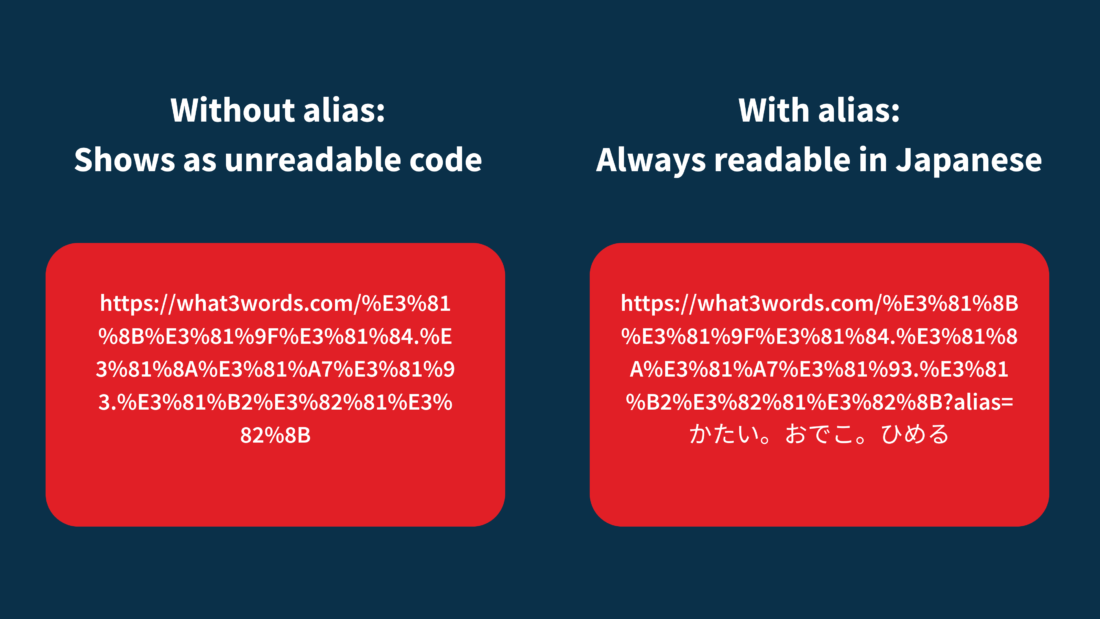
For example, consider the Japanese what3words address ///かたい。おでこ。ひめる. A direct URL to this address (without using
alias
) might look like:
-
Without
alias:https://what3words.com/%E3%81%8B%E3%81%9F%E3%81%84.%E3%81%8A%E3%81%A7%E3%81%93.%E3%81%B2%E3%82%81%E3%82%8B
All those
%E3%81...
codes are the UTF-8 percent-encoded representation of the Japanese characters “かたい。おでこ。ひめる”. This URL works, but if you saw it printed or pasted in a message, it would be nearly impossible to recognise the three words at a glance.
Now enter the
alias
parameter: by appending
?alias=かたい。おでこ。ひめる
to the URL, we include a clear text version of the address:
-
With
alias:https://what3words.com/%E3%81%8B%E3%81%9F%E3%81%84.%E3%81%8A%E3%81%A7%E3%81%93.%E3%81%B2%E3%82%81%E3%82%8B?alias=かたい。おでこ。ひめる
Now, anyone looking at the URL can see the actual Japanese words at the end, after
alias=
. Even though the path still has
%E3%81...
, the query parameter spells out “かたい。おでこ。ひめる” in Japanese.
When do URLs include
alias
, and when is it optional?
Not every what3words URL has an alias parameter. The general rule is: addresses that contain any non-ASCII characters will have
?alias=
appended, whereas addresses that are purely ASCII (A–Z letters, digits, etc.) typically won’t. In practice, this boils down to the script the what3words address is written in:
- Non-Latin scripts (non-ASCII): if the words are in scripts like Japanese hiragana, Chinese hanzi, Cyrillic, Greek, Hindi Devanagari, Arabic, etc., the what3words online map or app will append an alias parameter by default when you share or copy the address
-
Latin script (mostly ASCII): if the words use the Latin alphabet (like English, Spanish, German, etc.), the URL is naturally readable (e.g.
///filled.count.soapbecomeshttps://what3words.com/filled.count.soapin the path). These addresses don’t need an alias for readability, so the standard share link will not include one. In internal terms, all-ASCII languages have the alias flag set to false (e.g. English has no alias parameter by default) -
You can verify this: an English address like ///index.home.raft would simply be
https://what3words.com/index.home.raftwith no query string. Similarly, French or German addresses, even if they contain accented letters (é, ü, etc.), are still considered Latin script and typically omit the alias parameter.
Examples of
alias
in action (Japanese, Chinese, Bulgarian)
Let’s walk through a few concrete examples to see how
alias
makes a difference in the URL. We’ll use addresses in different scripts and show the URLs with and without the alias parameter:
-
Japanese (hiragana): what3words address ///かたい。おでこ。ひめる
Without alias:https://what3words.com/%E3%81%8B%E3%81%9F%E3%81%84.%E3%81%8A%E3%81%A7%E3%81%93.%E3%81%B2%E3%82%81%E3%82%8B
With alias:https://what3words.com/%E3%81%8B%E3%81%9F%E3%81%84.%E3%81%8A%E3%81%A7%E3%81%93.%E3%81%B2%E3%82%81%E3%82%8B?alias=かたい。おでこ。ひめる
Here you can clearly see the benefit – the alias part shows “かたい。おでこ。ひめる” in plain text. If someone sends you the second link, you immediately recognize the three Japanese words in it, whereas the first link is opaque. Both links would take you to the same map location, but the second is easier to verify by eye. - Traditional Chinese: consider a what3words address in Traditional Chinese, say ///想念.人影.喜歡
Without alias:
https://what3words.com/%E6%83%B3%E5%BF%B5.%E4%BA%BA%E5%BD%B1.%E5%96%9C%E6%AD%A1
With alias:
https://what3words.com/%E6%83%B3%E5%BF%B5.%E4%BA%BA%E5%BD%B1.%E5%96%9C%E6%AD%A1?alias=想念.人影.喜歡
Again, the alias version lets you actually read the Chinese characters for “想念.人影.喜歡” at the end of the URL. This is especially helpful if you’re sharing the address in a text message or on social media – the readers can see the Chinese words directly, instead of a string of “%E6%83%B3%E5%BF%B5…”.
- Bulgarian (Cyrillic): take the address ///пример.три.думи
Without alias:
https://what3words.com/%D0%BF%D1%80%D0%B8%D0%BC%D0%B5%D1%80.%D1%82%D1%80%D0%B8.%D0%B4%D1%83%D0%BC%D0%B8
With alias:
https://what3words.com/%D0%BF%D1%80%D0%B8%D0%BC%D0%B5%D1%80.%D1%82%D1%80%D0%B8.%D0%B4%D1%83%D0%BC%D0%B8?alias=пример.три.думи
In the alias version, anyone can spot that the address is “пример.три.думи” in Cyrillic script. The alias ensures that even if you don’t decode the
%D0%BF%D1%80...
sequences, you still have the original words intact. And if a piece of software only preserved the query string and not the path, you could recover the address from the alias. Bulgarian “share” links include the alias by default because Bulgarian uses a non-Latin script.
Side by side, these examples highlight how
alias
transforms an otherwise opaque URL into one where the what3words address is visible. For a visual comparison, see the figure below showing each of the above URLs before and after adding the alias parameter.
How does
alias
improve URLs?
The
alias
parameter brings several important benefits for sharing and using what3words addresses:
- Human-readable URLs: by containing an unencoded copy of the address, the alias makes the URL understandable to people. You can glance at a link and see the actual three words (even if they’re in Chinese, Japanese, Arabic, etc.). This transparency helps with manual confirmation of an address.
-
Interoperability with AI (LLM transparency)
: for machine learning models and language-processing AI (including Large Language Models), an alias-bearing URL is easier to interpret. An LLM reading text that contains
...?alias=想念.人影.喜歡can directly see the three Chinese words. Without alias, the model would see a sequence of complex characters (or might not realise it represents Chinese text at all). Thus, alias improves the semantic interpretability of what3words links for AI systems. This can be useful in contexts where AI systems scan or summarise documents containing what3words addresses – the model can identify and preserve the location reference more reliably if the words are exposed. - Consistency across languages: the alias parameter provides a uniform way to represent addresses from any script in a link. Developers don’t have to worry about special-casing certain languages for readability; if it’s a non-Latin address, the shared link will include alias automatically. This consistency means you can programmatically detect the address text from the URL if needed (by reading the alias param), which might help in debugging or logging addresses from user-shared URLs.
A special note about Vietnamese what3words URLs
- Vietnamese what3words addresses can be written with or without spaces (either all three words must contain 1-3 spaces or all three words must contain no spaces, not a blend), more fully described here .
- When sharing a what3words URL, only the unspaced version is ever used.
- Vietnamese what3words URLs also use the alias parameter given their character set (extended Latin script), and the Vietnamese what3words address following “alias=” should also be the unspaced version.
Building a what3words URL with
alias
(in code)
Typically, you’ll get a what3words link with an alias by using the official app or online map’s “share” or “copy link” function. But if you are constructing such URLs programmatically (for example, generating links for a list of coordinates in various languages), you should know how to include the alias properly. Here’s a simple example in JavaScript demonstrating how to build a what3words map link with the alias parameter:
// Example: Constructing a what3words URL with alias in JavaScript const threeWordAddress = "かたい。おでこ。ひめる"; // a Japanese 3-word address (no leading "///") const encodedPath = encodeURIComponent(threeWordAddress); // encodeURIComponent will percent-encode the non-ASCII characters and delimiter const w3wUrl = `https://what3words.com/${encodedPath}?alias=${threeWordAddress}`; console.log(w3wUrl); // Output: "https://what3words.com/%E3%81%8B%E3%81%9F%E3%81%84.%E3%81%8A%E3%81%A7%E3%81%93.%E3%81%B2%E3%82%81%E3%82%8B?alias=かたい。おでこ。ひめる"
A few things to note from the above snippet:
-
We started with the what3words address as a plain string
"かたい。おでこ。ひめる". This is exactly how you would write it when using the address (no///needed for the URL construction). -
We used
encodeURIComponent(in Python, you’d use a similar URL encoding function) on the whole string to create the path. This step is crucial because the domain part of the URL (what3words.com/) must be followed by a properly encoded path. The Japanese delimiter “。” and characters will get encoded (as shown in the output). -
We then append
?alias=and the original string. Notice we do not encode the alias part; we want it human-readable. It’s safe to include the raw Unicode characters in the query parameter section of the URL – browsers will handle encoding it as needed, or it may appear percent-encoded internally, but most systems will preserve it as is. The key is that you , the developer, are deliberately including the unencoded version here for readability. - The resulting URL contains the percent-encoded path (which is what the server needs to find the location) and the plain alias (which is what humans and other clients can read)
If you were doing this for a language that doesn’t need alias (say English), you could simply omit the
?alias=...
part.
Note for developers: keep in mind that any time you manually construct URLs, proper encoding is important. Always encode the path segments of the what3words address, and don’t encode the alias twice. In the above example, we used the raw
threeWordAddress
in the alias query – if we mistakenly encoded it again, it would defeat the purpose by turning the alias into % codes.
Summary
The
alias
query parameter might seem like a small detail, but it significantly enhances the usability of what3words links across different languages and platforms. By carrying a plain text copy of the what3words address, it ensures that no matter the script or how unfriendly a system is to non-ASCII text, the core location information remains visible and intact.
Next time you share a what3words address in Chinese, Japanese, Arabic, or any other non-Latin script, take a look at the URL. You’ll see
?alias=
followed by the address. Now you know that it’s intentionally placed there to help everyone (and every system) read the what3words address easily. And if you’re building services that pass around what3words addresses, you can leverage
alias
to make your implementations more robust. It’s a simple yet powerful feature that upholds what3words’ mission: helping everyone talk about everywhere.
| Language Name | ISO code | what3words API language code | what3words Locale code | Script | Use “alias” when sharing what3words address links |
| Afrikaans | af | af | Latin | FALSE | |
| Amharic | am | am | Ethiopic | TRUE | |
| Arabic | ar | ar | Arabic | TRUE | |
| Bahasa Indonesia | id | id | Latin | FALSE | |
| Bahasa Malaysia | ms | ms | Latin | FALSE | |
| Bengali | bn | bn | Bengali | TRUE | |
| Bosnian | bs | oo | oo_cy | Cyrillic | TRUE |
| Bosnian | bs | oo | oo_la | Latin | FALSE |
| Bulgarian | bg | bg | Cyrillic | TRUE | |
| Catalan | ca | ca | Latin | FALSE | |
| Chinese | zh | zh | zh_si | Han (Simplified) | TRUE |
| Chinese | zh | zh | zh_tr | Han (Traditional) | TRUE |
| Croatian | hr | oo | oo_cy | Cyrillic | TRUE |
| Croatian | hr | oo | oo_la | Latin | FALSE |
| Czech | cs | cs | Latin | FALSE | |
| Danish | da | da | Latin | FALSE | |
| Dutch | nl | nl | Latin | FALSE | |
| English | en | en | Latin | FALSE | |
| Estonian | et | et | Latin | FALSE | |
| Finnish | fi | fi | Latin | FALSE | |
| French | fr | fr | Latin | FALSE | |
| German | de | de | Latin | FALSE | |
| Greek | el | el | Greek | TRUE | |
| Gujarati | gu | gu | Gujarati | TRUE | |
| Hebrew | he | he | Hebrew | TRUE | |
| Hindi | hi | hi | Devanagari | TRUE | |
| Hungarian | hu | hu | Latin | FALSE | |
| isiXhosa | xh | xh | Latin | FALSE | |
| isiZulu | zu | zu | Latin | FALSE | |
| Italian | it | it | Latin | FALSE | |
| Japanese | ja | ja | Hiragana | TRUE | |
| Kannada | kn | kn | Kannada | TRUE | |
| Kazakh | kk | kk | kk_cy | Cyrillic | TRUE |
| Kazakh | kk | kk | kk_la | Latin | FALSE |
| Khmer | km | km | Khmer | TRUE | |
| Korean | ko | ko | Hangul | TRUE | |
| Lao | lo | lo | Lao | TRUE | |
| Malayalam | ml | ml | Malayalam | TRUE | |
| Marathi | mr | mr | Devanagari | TRUE | |
| Mongolian | mn | mn | mn_cy | Cyrillic | TRUE |
| Mongolian | mn | mn | mn_la | Latin | FALSE |
| Montenegrin | me | oo | oo_cy | Cyrillic | TRUE |
| Montenegrin | me | oo | oo_la | Latin | FALSE |
| Nepali | ne | ne | Devanagari | TRUE | |
| Norwegian | no | no | Latin | FALSE | |
| Odia | or | or | Oriya (Odia) | TRUE | |
| Persian | fa | fa | Arabic | TRUE | |
| Polish | pl | pl | Latin | FALSE | |
| Portuguese | pt | pt | Latin | FALSE | |
| Punjabi | pa | pa | Gurmukhi | TRUE | |
| Romanian | ro | ro | Latin | FALSE | |
| Russian | ru | ru | Cyrillic | TRUE | |
| Serbian | sr | oo | oo_cy | Cyrillic | TRUE |
| Serbian | sr | oo | oo_la | Latin | FALSE |
| Sinhala | si | si | Sinhala | TRUE | |
| Slovak | sk | sk | Latin | FALSE | |
| Slovene | sl | sl | Latin | FALSE | |
| Spanish | es | es | Latin | FALSE | |
| Swahili | sw | sw | Latin | FALSE | |
| Swedish | sv | sv | Latin | FALSE | |
| Tamil | ta | ta | Tamil | TRUE | |
| Telugu | te | te | Telugu | TRUE | |
| Thai | th | th | Thai | TRUE | |
| Turkish | tr | tr | Latin | FALSE | |
| Ukrainian | uk | uk | Cyrillic | TRUE | |
| Urdu | ur | ur | Arabic | TRUE | |
| Vietnamese | vi | vi | Latin | TRUE | |
| Welsh | cy | cy | Latin | FALSE |